Deploying fleet management software should not be viewed solely as installing GPS tracking devices in vehicles. In practice, it is an organisational, technological and operational process that brings structure to the way the entire vehicle fleet is managed—from vehicle and driver data and internal procedures to reporting, fleet safety, cost control, fuel management, fuel consumption, operational costs and day-to-day communication with company vehicle users.
FleetOnAir is fleet management software that helps companies digitalise vehicle fleet management. It brings together GPS tracking, telematics data, driver behaviour analysis, reports, alerts, cost information, vehicle documentation and operational processes within a single environment. As a result, fleet managers no longer have to rely solely on spreadsheets, emails, manually compiled reports and fragmented data sources.
Launching the platform itself, however, is only one part of the process. For a fleet management system such as FleetOnAir to deliver tangible business value, the company must prepare its data, define the software's functional scope, select the right telematics model, plan device installation, train fleet managers and ensure a clear onboarding process for drivers.
This article explains what a professional FleetOnAir implementation may look like, step by step, and how to prepare the organisation before launching fleet management software.

Implementing fleet management software is about more than technology
In many organisations, the decision to deploy fleet management software is made when the existing operating model is no longer sufficient. The fleet is growing, more fleet drivers are using business vehicles, fuel costs, maintenance costs and other operating costs require tighter control, and fleet data is scattered across Excel spreadsheets, calendars, invoices, fuel card records, vehicle documents and emails.
In such an environment, fleet managers often work reactively. They may only become aware of a problem when a vehicle's inspection has expired, a driver reports damage late, a vehicle is unavailable when needed or unplanned vehicle downtime causes maintenance costs to rise for no apparent reason.
FleetOnAir enables organisations to move from this model to data-driven fleet management. It is not simply about tracking vehicles through real time vehicle tracking and location tracking or viewing vehicle locations on a map. The key is to create complete visibility through a consistent process in which vehicle data, user information, fleet procedures and operational reports form a single working environment.
FleetOnAir implementation should therefore be treated as a project that brings structure to the vehicle fleet and supports efficient fleet management—not merely as the technical launch of an application.

Stage 1: analysing fleet requirements, business objectives, fuel management and operational costs
The first step is to define why the company is implementing FleetOnAir, which business objectives it wants to achieve and which problems it needs to address first. An organisation primarily interested in tracking vehicles and their locations will require a different implementation from a company focused on fuel management, where the priorities are to reduce fuel costs, control fuel consumption, track fuel usage, improve fuel efficiency and identify excessive fuel consumption. The process will differ again for an organisation seeking to manage the entire vehicle lifecycle—from handover and use through vehicle maintenance and damage handling to return.
At this stage, it is worth answering several questions:
- How many fleet vehicles will be included in the implementation?
- Is the fleet centralised or distributed across multiple locations?
- How many drivers use the vehicles?
- Are vehicles assigned to individual users, or do they operate as pool vehicles?
- What data is currently collected?
- Which processes are handled manually?
- What reports are required by fleet managers, fleet operators, the executive team, HR or the finance department?
- Does the system need to integrate with other business tools and accommodate the organisation's specific requirements?
This stage helps define the appropriate scope of the implementation. FleetOnAir supports both essential fleet management software requirements and more advanced fleet management solutions, including fleet tracking, GPS tracking, Eco-Driving, driver behaviour analysis, automated alerts, digital vehicle handover and return protocols, pool vehicle reservations, fleet cost reporting and integrations with other systems.
A thorough needs assessment prevents a situation in which the company purchases technology without knowing how to use the management software in its day-to-day operations, while allowing fleet managers to translate data into effective management decisions.
Stage 2: preparing fleet vehicles, fleet data and driver management records
One of the most important implementation stages is preparing the data that will populate the system and enable effective vehicle management. This is when the organisation should consolidate and standardise information about its fleet vehicles and their users.
The essential vehicle data required from the customer includes:
- registration number,
- Vehicle Identification Number (VIN),
- date of first registration.
The remaining technical vehicle details are retrieved automatically from Poland's Central Register of Vehicles and Drivers (CEPiK) and the Insurance Guarantee Fund (UFG) databases.
The second category covers driver management and vehicle user data. Depending on the fleet's operating model, this may include the user's full name, email address, telephone number, department, location, assigned vehicle, application permissions and area of responsibility for the vehicle.
This stage should be treated not only as the technical preparation of an import file, but also as a data quality audit. If the organisation uses several different versions of its vehicle list, inconsistent registration number formats, outdated driver assignments or incomplete maintenance records and vehicle inspection deadlines, implementing the system provides an ideal opportunity to clean up and standardise this information.
The better the quality of the initial database, the sooner the management software can begin delivering tangible value, supporting fleet administration and providing complete visibility of fleet assets and critical information.
Stage 3: fleet Administration, cost control and standardising fleet procedures
Implementing FleetOnAir should also include an analysis of internal procedures, as fleet administration is an essential part of the overall process. A fleet management system does not operate in isolation; the rules governing the fleet should therefore be clearly defined to ensure compliance with the fleet policy. The software must reflect how the organisation actually operates, including its vehicle usage rules, vehicle handover and return processes, damage reporting, trip classification and settlement procedures, and the handling of exceptional situations.
At this stage, the organisation should review areas such as:
- the fleet policy,
- the vehicle handover procedure,
- the vehicle return procedure,
- damage reporting rules,
- the rules governing the private use of company vehicles,
- the cost control and cost approval process,
- fuel management, refuelling rules and fuel card usage,
- pool vehicle management,
- the driver's responsibilities for the vehicle.
FleetOnAir supports not only the digitalisation of existing processes but also their standardisation. If a company has previously relied on paper documents, emails and informal arrangements in its daily business operations, implementation is an excellent opportunity to establish a clearer and more repeatable operating model.
Vehicle handover and return procedures are particularly important because they play a key role in reducing errors and disputes. Digital protocols, documented vehicle inspections, photographic evidence, confirmation of vehicle condition, acceptance of relevant policies and automatic archiving can significantly reduce the risk of disputes and documentation errors.
Stage 4: selecting a fleet tracking model to monitor driver behaviour—OBD or CAN integration
The next step is to select the fleet tracking method used to collect data on vehicle performance and driver performance. In practice, vehicle tracking systems commonly rely on two primary models: OBD devices and solutions that retrieve data from the CAN.
OBD devices are a suitable choice when a company wants to use GPS technology to deploy tracking quickly, access essential operating data and use real time vehicle tracking to check vehicle locations. The tracking device connects to the vehicle's diagnostic port without requiring specialist modifications to the vehicle's electrical system. Deployment can therefore be fast, straightforward and less demanding from an organisational perspective.
This vehicle tracking model is particularly well suited to companies that initially require fundamental fleet visibility, including vehicle locations, location data, route history, mileage, speed, alerts and a general analysis of vehicle utilisation.
The second option is CAN integration. This approach requires installation by a technician, but it provides access to a broader range of vehicle data. Depending on the vehicle, these vehicle tracking systems may provide ignition status, door opening events, seat belt use, operating parameters, technical events and engine diagnostics.
CAN integration is particularly worth considering when a company requires deeper analytics, tighter vehicle control, improved asset protection, stronger fleet safety, the ability to monitor driver behaviour or more precise vehicle performance data for reporting and automation.
In some cases, integration with factory-installed vehicle tracking systems and built-in GPS technology is also possible. This option may appeal to companies whose vehicles are already suitably equipped and that want to avoid installing additional devices. Potential limitations must nevertheless be considered, including subscription fees for access to manufacturer data and the restricted range of information made available, which may vary by vehicle make and model.
Most importantly, GPS technology should not be selected independently of the business objective. Before making a decision, the organisation should compare the fleet's requirements with the scope of data the GPS system is expected to provide. Not every fleet needs the most advanced option. In some cases, fast and straightforward OBD tracking is sufficient; in others, only CAN data can deliver the required level of control.

Stage 5: shipping and installing GPS Devices for vehicle tracking
Once the technology has been selected, the next task is to organise the devices and their installation. This part of fleet operations prepares the vehicles to work with the system. It is often one of the main operational challenges because it involves physical vehicles, drivers, schedules, locations and vehicle availability.
For OBD devices, the process can be very straightforward. Tracking devices may be shipped to the company's headquarters or directly to vehicle users. The driver receives the device, connects it to the OBD port and can begin using the system by following the instructions provided.
This approach significantly reduces logistical requirements and enables a large number of fleet assets to be connected quickly, including fleets distributed across multiple locations.
CAN bus installations require a technician's visit. In this model, appointment coordination, communication with users, vehicle availability and installation status reporting become critical.
A well-planned installation process should include:
- a list of vehicles covered by the installation,
- each vehicle's location,
- contact details for users or responsible persons,
- an installation schedule,
- confirmation that the installation has been completed,
- verification that the device is operating correctly and supporting real time vehicle tracking,
- an update to the vehicle's status in the system.
From fleet managers' perspective, it is important that they do not have to manage the entire technical process themselves. A professional implementation should remove as much administrative work as possible from their workload, including arranging installations, confirming appointments, monitoring progress and collecting feedback. Fleet managers can then focus on organising the process within the company instead of manually coordinating every installation.
Stage 6: configuring modern fleet management software—FleetOnAir
Once the data has been prepared and the devices installed, the platform can be configured. At this point, FleetOnAir is adapted to the organisation's working practices and fleet management model.
Configuration may include:
- the fleet structure,
- vehicle groups,
- user roles and permissions,
- driver-to-vehicle assignments,
- alert types,
- notification rules,
- reporting scope, including maintenance reports,
- dashboard views and real-time reports,
- vehicle maintenance schedules and rules for scheduling maintenance and inspections,
- data access policies,
- integrations with other tools.
It is important not to overload the management software from day one. A well-planned implementation should balance the platform's capabilities with the organisation's readiness to use data effectively. In some cases, it is better to begin with the most important functions and gradually expand the software's scope so that modern fleet management develops in manageable stages.
For example, the first stage may cover GPS tracking, the vehicle database, driver records, alerts, maintenance schedules and essential reports. Subsequent stages may add Eco-Driving, driver performance scoring, digital protocols, pool vehicle management, advanced cost analytics or integrations with ERP, CRM, HR and payroll systems.
Stage 7: training fleet managers and administrators
Even the best management software will not deliver the expected results if the people responsible for the fleet do not know how to use it. Training fleet managers is therefore a key element of the implementation.
Training should cover both platform operation and practical day-to-day use cases. It is not enough to demonstrate where to click to generate a report. More importantly, users need to understand how system data can support operational decisions.
Fleet managers should understand, among other things:
- how to monitor vehicle tracking data and vehicle status,
- how to analyse route history,
- how to use alerts,
- how to interpret driving-style data, monitor driver behaviour and identify warning signs that may indicate unsafe driving,
- how to review mileage and vehicle utilisation,
- how to manage users,
- how to prepare reports on fleet costs, total cost, mileage, asset utilisation, vehicle performance and operational efficiency,
- how to respond to incidents,
- how to use the system in discussions with drivers and senior management.
Effective training should be practical and based on real examples from the customer's fleet, enabling fleet managers to apply the system in their daily work more quickly. Administrators then learn in context and can immediately see how the platform supports their responsibilities.
Stage 8: driver management, driver training and driver safety
Introducing fleet management software affects more than fleet managers. Drivers and vehicle users are another critical stakeholder group. They use the mobile app on a mobile device, receive instructions, review vehicle usage rules and are often the first to report damage, technical problems or procedural uncertainties.
Driver onboarding should therefore be planned just as carefully as system configuration.
The most important task is to explain clearly why the company is implementing FleetOnAir. If drivers perceive the system solely as a monitoring tool, it may cause concern and resistance. If communication instead demonstrates that its purpose is to protect drivers, improve driver safety, create order, simplify procedures, reduce paperwork, enhance damage handling and provide clearer rules, acceptance is likely to be considerably higher.
Driver onboarding may include:
- instructions for using the mobile app from any location and on any mobile device,
- login and first-launch guidance,
- information on the scope of data collected,
- an explanation of how the system assesses driver behaviour, driver performance and driving style,
- the damage reporting procedure,
- vehicle usage rules,
- the vehicle collection and return procedure,
- the fleet policy,
- frequently asked questions,
- contact details for the person responsible for the fleet.
In a modern implementation model, onboarding and online training can be delivered remotely—for example, through the mobile app, step-by-step instructions, educational materials or a dedicated information package prepared for the organisation. Every driver receives the same consistent set of rules, regardless of location, department or vehicle type.
This is particularly important for distributed organisations, where providing conventional in-person training to every user would be difficult to coordinate.
Stage 9: full rollout, fleet operations and efficient fleet management
Once preparation, installation, configuration, training and testing have been completed, the system can be rolled out across the entire fleet. This is not the end of the implementation, however, but the beginning of regular, data-driven work.
FleetOnAir delivers the greatest value when the organisation uses the platform consistently and treats it as a tool that supports ongoing fleet operations. The system should assist fleet managers with daily decisions, including efforts to reduce fuel costs, while also supplying data for weekly, monthly and quarterly analyses.
In practice, it is worth establishing a regular operating rhythm, for example:
- daily review of real-time alerts and events,
- weekly analysis of vehicle utilisation and asset utilisation,
- monthly reporting on fleet costs, fuel consumption, fuel usage and mileage,
- periodic analysis of driving style,
- monitoring of fleet maintenance and vehicle maintenance schedules, including preventive maintenance, insurance policy deadlines, roadworthiness tests and vehicle inspections to ensure compliance,
- review of damage claims and incidents,
- analysis of underutilised vehicles and vehicle uptime,
- recommendations for changes to the fleet policy.
Only then does FleetOnAir become more than a GPS tracking tool. It helps organisations monitor vehicles, analyse costs, respond rapidly to alerts and manage the fleet effectively. The platform begins to serve as a fleet management hub in which data leads to concrete decisions: reduce costs, optimise fleet costs, improve vehicle uptime, strengthen driver safety and asset utilisation, decrease administrative errors and increase operational predictability.
Stage 10: verifying management software performance and implementation outcomes
The final stage is to assess whether the FleetOnAir fleet management system operates as intended and meets the organisation's requirements. The company should analyse the initial data, gather feedback from fleet managers and drivers, and identify areas that require further configuration. Regular optimisation makes it possible to increase the operational efficiency of both the system and the fleet over time.
Implementing fleet management software for the first time vs migrating from another solution
FleetOnAir implementation may involve two types of organisations seeking to improve vehicle fleet management and day-to-day vehicle administration. The first group consists of companies that have not previously used professional fleet management software and have relied on Excel spreadsheets, calendars, paper documents and email communication. The second comprises organisations that already use other fleet management solutions but want to migrate to a more suitable, modern or comprehensive platform.
In both cases, the core implementation process is similar: the organisation must prepare its data, standardise processes, select the appropriate technology, configure the system, train users and begin working with reports. During a migration, however, additional attention must be paid to the quality of historical data, exporting information from the previous system, maintaining continuity between vehicle tracking systems, scheduling the device switchover and communicating the changes to users.
For this reason, FleetOnAir implementation is best viewed more broadly—not as a one-off migration between fleet management solutions, but as a project to improve and standardise fleet management. This perspective better reflects the management software's actual value.
Management software, vehicle downtime and operational challenges during implementation
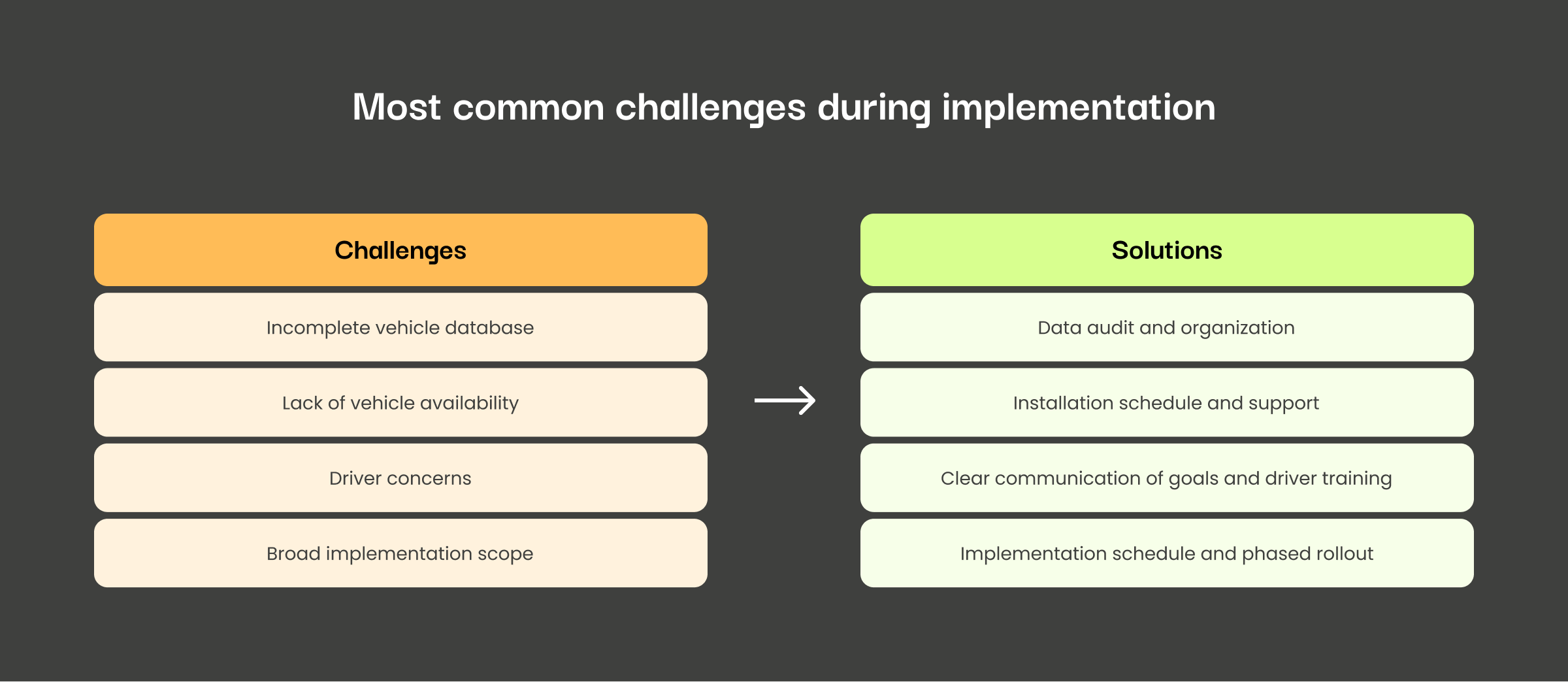
A fleet management platform can be deployed quickly, but the process requires careful coordination. The most common challenges are not caused by the technology itself; they arise from data, procedures, communication and the organisation's overall approach to fleet management.
The first challenge is an incomplete database of fleet vehicles. If the fleet data is outdated, fragmented or inconsistent, the management software can still be launched, but the value it delivers will be limited. It is therefore worth investing time in organising and validating information before the rollout.
The second challenge is vehicle availability during device installation. This is less of an issue with OBD devices, but CAN bus installations require careful scheduling and coordination with users to limit vehicle downtime.
The third challenge is communication with drivers. Failing to explain the purpose of the implementation clearly can lead to misunderstandings. Drivers should understand what data is collected, how it is used and how the new system benefits them.
The fourth challenge is an overly broad initial scope, particularly when a company attempts to gain complete control over all processes immediately. If every fleet management software function is launched at once, users may feel overwhelmed. A phased approach is more effective: establish the foundations first, then introduce additional modules and automations.
The fifth challenge is the absence of a regular operating rhythm after launch. Without systematic data analysis, fleet managers cannot reliably improve safety, reduce costs or increase the efficiency of fleet operations. The mere availability of data does not improve fleet management. Data must be analysed, discussed and translated into decisions.
Benefits of FleetOnAir for asset utilisation, fleet safety and cost optimisation
A well-planned FleetOnAir implementation benefits the company at several levels. For fleet managers, it primarily provides greater control and reduces manual work. Instead of searching for information across multiple sources, they can use a single fleet management software platform for tracking vehicles that displays vehicle status, vehicle tracking data, route history, alerts, mileage, vehicle maintenance schedules and reports. For drivers, it means clearer vehicle usage rules, easier access to information, the convenience of a mobile app and more structured incident reporting procedures.
For the executive team and finance departments, the system provides better cost visibility, fuel consumption analysis, greater predictability, the ability to analyse trends and the means to make data-driven rather than intuition-based decisions. This helps reduce fuel costs and other operational costs, improve fuel efficiency, and support better planning and use of company vehicles. For the organisation as a whole, implementing FleetOnAir can mean less disorder, fewer paper documents, fewer errors, greater control over company assets and improved safety for vehicle users.
The most important benefit, however, is a change in the way the fleet is managed. Modern technology and advanced telematics support effective fleet management without creating unnecessary administrative work. Instead of operating reactively, the company can develop a more informed, measurable and structured fleet management model.
Summary
FleetOnAir implementation is a process that should be approached strategically. It is more than a GPS tracking system: it is modern fleet management software that brings structure to data, procedures and day-to-day operations. The process is not limited to installing GPS devices or launching an application. Genuine value is created when technology is combined with well-prepared data, clear procedures, a properly trained team and regular use of reports.
With the FleetOnAir management software, a company can move from fragmented, manual fleet administration to a model in which vehicle tracking, drivers, costs, events and processes are visible in one place in real time. This reduces administrative work, improves safety and vehicle utilisation, and supports better business decisions.
Whether an organisation is deploying fleet management software for the first time or migrating from other fleet management solutions, thorough preparation and alignment of the platform with the organisation's needs are essential. These factors determine whether FleetOnAir becomes merely another tool or a genuine fleet management hub.